显示标签为“toner chips”的博文。显示所有博文

2013年12月14日星期六

Toner Chip are not recognized by machine

PCC- Guide for Toner chip common problem 
Part 1- Toner Chip are not recognized by machine


Several common phenomenons when chip does not recognize, as follows:

1. 
For machine with light on control panel, it show: “toner warning”, “error light up or twinkling”;

2. 
For machine with control panel display and status monitor, it show: “no toner”, “incompatible toner”, etc

Why Toner Chips are not recognized by machine?

Analysis reason 1: printer can’t detect toner chip, so can’t communicate
Treatment:

• Check this chip weather installed correctly, off, loose or not?
• Check the printer weather connects well with chip, damage, Poor elasticity or not?
• Check the chip contacts and the printer detects weather dirt needle or not?
• Confirm using toner cartridge compatibility


Analysis reason 2: toner chip hardware is bad.

Treatment:
• Check all chip components whether soldering well or not?
• Check all chips component without seamless welding chips, welding wrong, welding anti phenomena 
• Check all chips component without damage, fracture phenomena.Analysis reason 
   3:  toner chip software is bad.

Treatment: 
• For some model toner chips, especially Samsung toner chips, Xerox toner chips, Kyocera chips, there are different versions chip used for different countries, there are EUROPE VERSION, CHINA VERSION, KOREA VERSION and AMERICA VERSION etc. So, please make that you choice the right version toner chip for your machine.

Analysis reason 4: toner chips not recognized by incorrect operations  

Treatment: 
• When install toner chip, avoid using plasticizes or over wet adhesive tape to secure the chip

• When install toner chip, if toner chip oversized and hard into the installation position, please do not force loading, easy to damage the chip components.

• When testing toner chip before shipping, please make sure that tester detects needle
Contact correct until testing finished, please don’t intermittent contact

• When toner chip printing and printing not-stop, please don’t suddenly opening and close lid, switch machine, powder offer etc 

• when toner chip printing, paper jam occurs,  after clear jam paper, should check toner chip positioned are OK,  to prevent toner chip poor contact caused by jam paper.


MSN:printer_chips@hotmail.com
Skype: toner_linda
ICQ: 697-871-867
Phone: 0086-15860954485
www.pcc-online.com.cn





2013年11月26日星期二

Toner Chip Manufacturing Process

PCC- Toner Chips Manufacturing Process

PCC, export toner chips for Samsung, HP, Xerox, Konica Minolta, Dell, Epson, Oki, Sharp, Brother, Canon, Panasonic, Kyocera, Utax, Brother, Toshiba, Ricoh etc. 


Quality control: Every chip has strict quality control before shipping, and our defective rate is lower than 0.1% for hp toner chips, and defective rate is lower than 0.3% for other chips.


Quality guarantee Policy: guarantee is 1:1 replace if there is any defective


Shipping Time: As usual, chips order will be sent in about 3 days after confirm order


Our Aims: Good quality, Good pre-sale service, Good after-sale service, good price to you.


Last, Show you our a brief toner chips manufacturing process here:


                                                                                If any news or question, you can let me know in time.

pcc@pcc-online.com.cn

2013年11月21日星期四

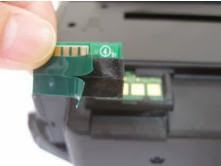
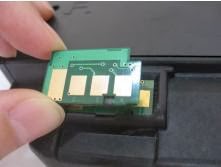
Instruction manual for Samsung mlt-d205 chips


1. Replace a new chips when printer show toner low, see photo 1


2. Put out the peel of the adhesive tape, see photo


3. Attached a new chip on the OEM chips place.


4. Finish and you can insert into the printer


If any question, you can let me know and talk more.
MSN:printer_chips@hotmail.com
Skype: toner_linda
ICQ: 697-871-867
Phone: 0086-15860954485


2013年11月20日星期三

Instruction manual for Samsung CLT-406 chips


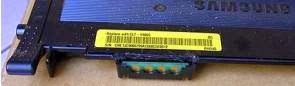
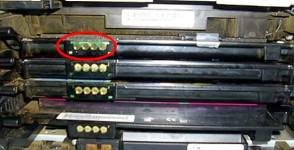
1. Fine out the OEM chips, please see photo 


2. Use tool to cut out the RED area, as showed on the picture


3. Then you can see the OEM chips.


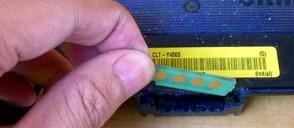
4. Take out the OEM chips, see as the picture.


5.Insert our compatible new chip to the cartridge, please notice the direction of the chip,
The breach must under the golden contact and the left side.


6. Install the cartridge into the printer, please see the photo:


If any question, you can let me know and talk more.
MSN:printer_chips@hotmail.com
Skype: toner_linda
ICQ: 697-871-867
Phone: 0086-15860954485


2013年11月19日星期二

PCC --- promotion some toner chips for Sharp, Konica Minolta, Kyocera---to save 20% for you


We are PCC, a toner chip supplier in China. Our chips quality is very good and our guarantee is 1:1 replace if there is any defective. We offer toner chips for Samsung, HP, Xerox, Konica minolta, Dell, Epson, Oki, Sharp, Brother, Canon, Kyocera, Utax, Brother, Toshiba, Ricoh etc. 

To thanks business friends support our business, we have an activity for some sharp, minolta, kyocera toner chips as follows:


Chips for Kyocera :

chips for Kyocera TK-310
chips for Kyocera TK-320 
chips for Kyocera TK-330 
chips for Kyocera TK-170 
chips for Kyocera TK-160 
chips for Kyocera TK-340 
chips for Kyocera TK-110 
chips for Kyocera TK-110E


Chips for Sharp :

chips for Sharp AR311
chips for Sharp MX235/2008
chips for Sharp AR270
chips for Sharp AR310
chips for Sharp AR016
chips for Sharp AR203
chips for Sharp AR153
chips for Sharp AR161/200
chips for Sharp AR021/022ST-C
chips for Sharp AR020/021
chips for Sharp AR202
chips for Sharp AR152
chips for Sharp MX312
chips for Sharp AR451/455/456
chips for Sharp AR450
chips for Sharp AR3511
chips for Sharp AR620/621


Chips for Minolta :

chips for minolta C15/17/18
chips for minolta 8650
chips for minolta C224/284/364/564/754
chips for minolta C200/203/253/353
chips for minolta C300/352
chips for minolta 1600W/1660W/1680W/1690W
chips for minolta 4650/4690/4695
chips for minolta C220/280/360
chips for minolta DI1610/160/161


Please note.. If any news or question, you can let me know and talk more in time.

Anderson
Skype: toner_linda
ICQ: 697-871-867

2013年11月18日星期一

instruction Manual for 
Minolta Bizhub C452C552C652 IU CMY chips


If any question, you can let me know and talk more.
MSN:printer_chips@hotmail.com
Skype: toner_linda
ICQ: 697-871-867
Phone: 0086-15860954485

instruction Manual for Minolta Bizhub C452C552C652 IU Black chips


1. Open the front door and take out the waste toner box by pressing on the directions that the arrows shows on photo, and display the black UI, witch is located the firsts on starting to count from the right, it is the bigger one.


2. Looking at the front, unscrew the big screw, see at the following photo for located it. Not possible to fall, it is just for ensure the UI is not moving anymore inside the machine.. 


3. Next step is slide the image unit out by the holder, till the end.


4. Once out, it can’t drop, guides are holding the kit, take easy.


5. Now we have to separate the drum unit from the developing unit, it is easy to do but please be very carefull, not to damage the opc surface of the drum. Look it on the direction of the photo and with the two hands at same time take out the drum while pressing with your fingers. Note that drum unit is not leaved, just lift it.


6. Once drum unit is out only developer unit will be hanged on the rails, as the photo.


7. Located the chips on the drum unit and replace for a new chip


8. Job done, now we need to install again the drum unit over the developer unit, reverse action from step 5, 


9. Ensure that it is properly fit, and push inside the machine again the black image unit till the end, then you can screw again it to the machine and then reinstall the water toner box back by pressing inside strong until it get armed for end our work. 


10. Close the front cover, wait until machine recognizes new chips, will reset the full lifecycle and will make an stabilization process as a new drum unit installed.

 If any question, you can let me know and talk more.

MSN:printer_chips@hotmail.com
Skype: toner_linda
ICQ: 697-871-867
Phone: 0086-15860954485

PCC-Instruction manual for OKI B411/B431 chips
pcc@pcc-online.com.cn


If any question, you can let me know and talk more.
MSN:printer_chips@hotmail.com
Skype: toner_linda
ICQ: 697-871-867
Phone: 0086-15860954485

2013年11月17日星期日

Instruction manual for Sim cards OKI B2500/B4500, Ricoh SP1000, Xerox 3100
pcc@pcc-online.com.cn


1. When the toner in the cartridge is near the end there will be a message ‘TONER NEAR END”, And when the toner is completely empty there will be a message “ TONER EMPTY REPLACE”  


2. After refilling the new cartridge put the card as shown on the picture , see photo (2)


3. There will be a message: “CHANGE TONEER?”, YES=OK—NO=C


4. Press OK and there will be a message: OPEN FRONT COVER, REPLACE TONER


5. Insert the cartridge as shown on the picture, see photo (3)


6. Close the front cover and there will be a message: HAVE YOU CHANGED THE TONER? <OK> see photo (4)


7. Press OK and wait unit the new cartridge is initialized and after viewing the message: REMOVE CARD” please remove the card.

Please use thte card for a new cycle after the toner is completely empty.


If any question, you can let me know and talk more.
MSN:printer_chips@hotmail.com
Skype: toner_linda
ICQ: 697-871-867
Phone: 0086-15860954485


2013年11月14日星期四

Hot selling toner chips


Toner chips for Samsung: 

Toner Chips for samsung mlt-d101, 
Toner Chips for samsung mlt-d103, 
Toner Chips for samsung clt-d406, 
Toner Chips for samsung clt-d506; 
Toner Chips for samsung mlt-d104,
Toner Chips for samsung mlt-d105,
Toner Chips for samsung mlt-d108, 
Toner Chips for samsung mlt-d109;


Toner chips for xerox: 


Toner Chips for xerox 3010,
Toner Chips for xerox 5225, 
Toner Chips for xerox 3220, 
Toner Chips for xerox wc5016, 
Toner Chips for xerox 3140, 
Toner Chips for xerox dc250/ dc260;


Toner chips for Ricoh: 

Toner Chips for Ricoh mpc 3500, 
Toner Chips for Ricoh mpc 2500, 
Toner Chips for Ricoh mpc 4500, 
Toner Chips for Ricoh mpc 3000, 
Toner Chips for Ricoh 3200, 3300;


Toner chips for HP: 


Toner chips universal for HP CE390X/CC388A/CB435A/CB436A/CE278A/CF280X/CE255X Toner chips Chips universal for HP CE285A/CE278ACB436A/CB435A/CE505A/CE255A/CC364A Toner chips Chips universal for HP CF280X/CB435A/CB436A/CE278A/CE505A/CE255X/


Toner chips for Kyocera: 


Toner Chips kyocera TK-160, 
Toner Chips kyocera TK-170, 
Toner Chips kyocera TK-1100, 
Toner Chips kyocera TK-1120, 
Toner Chips kyocera TK-3100, 
Toner Chips kyocera TK-3130, 
Toner Chips kyocera TK-1130, 
Toner Chips kyocera TK-1140 etc


MSN:printer_chips@hotmail.com
Skype: toner_linda
ICQ: 697-871-867
Phone: 0086-15860954485
www.pcc-online.com.cn